

Quality Mold

What Are the Top LSX Series Flexible LED Display Types?

Choosing a flexible LED display is not just a question of shape. Installation space, viewing distance, brightness, and maintenance access all affect the result. The LSX Series · Flexible LED Display range can support creative layouts, but the right configuration depends on the project and the product specifications available.

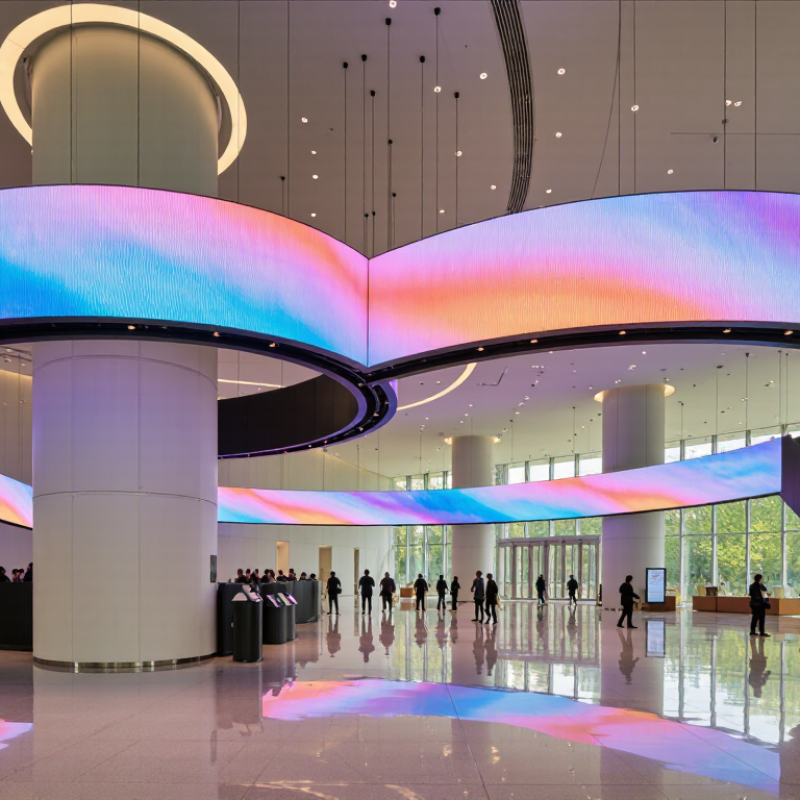
Common types include curved displays for columns or rounded walls, wave-shaped screens for flowing architectural features, and ribbon displays for long, narrow areas. Some installations use flexible panels to form cylindrical or other custom-shaped screens. Each option creates a different viewing experience. A curved screen can feel immersive; a ribbon display can guide attention across a lobby. Small details matter. The panel’s bend radius, cabinet structure, pixel pitch, and installation method should be checked before design approval. Do not assume every flexible model supports every curve or environment.

This guide compares the main LSX Series display types and explains where each may work best. It also points to practical questions for integrators and buyers, including how content will appear from nearby seats and how technicians can reach the panels. Specifications should be confirmed with the manufacturer for the exact model. That step is easy to overlook. A visually striking shape may still be a poor fit if the viewing distance or service plan is wrong. The most useful choice is not always the most dramatic one. It is the one that fits the site, content, and operating needs.
What Are the Top LSX Series Flexible LED Display Types?

LSX Flexible LED Types by Pixel Pitch: P1.5–P4 and Viewing Distance

LSX flexible LED displays are available in pixel pitches from P1.5 to P4. Pitch describes the distance between neighboring pixels: a smaller number usually produces a sharper image at close range. As a rough starting point, P1.5 may suit viewers about 1.5 meters away, while P4 often works better around 4 meters or farther. These are estimates, not guarantees. Content, brightness, and room lighting also affect what viewers perceive.

For a curved lobby wall or a compact retail display, P1.5 or P2 can keep text and fine details clear at nearby viewing positions. A larger installation viewed from across a hall may use P2.5, P3, or P4 without making the pixel structure distracting. Check the actual viewing distance from the closest seat, not just the room’s average distance. Curvature can also change sightlines. A small test section helps, though it may not perfectly represent the finished installation.

Tips: Match pitch to the nearest viewer, then confirm with a sample at the intended brightness. Read small text from several angles. Measure twice. A finer pitch can improve close-up detail, but it may increase cost and power needs; sometimes the first estimate needs revising.

Indoor vs. Outdoor LSX Displays: Comparing IP20 and IP65 Protection

LSX flexible LED displays can be configured for indoor or outdoor use, but the environment should guide the protection rating. Indoor models commonly use an IP20 rating. That means they resist contact with larger solid objects, but offer no rated protection against water. In a clean showroom or control room, this may be sufficient. Keep them away from damp walls, drink spills, and heavy dust.

Outdoor models often carry an IP65 rating. The first digit indicates dust-tight protection; the second indicates resistance to water jets. It does not mean the display can be submerged. Rain, wind-driven grit, and regular cleaning can make IP65 a practical choice for exposed installations. Still, check the full assembly: connectors, cable entries, seams, and the mounting structure can affect real-world protection.

The rating is only part of the decision. An indoor LSX display may deliver a crisp image under controlled lighting, while an outdoor version needs suitable brightness and thermal management. Ask for test details covering the complete installed display, not just individual modules. A label can sound more reassuring than it is. Even an IP65 unit needs careful sealing and maintenance, especially where flexible sections meet.

Curved, Cylindrical, and Wave-Shaped LSX Displays: Bend Radius and Form

Curved, cylindrical, and wave-shaped LSX displays each need a different bending plan. A curved wall usually uses a steady arc; a cylindrical installation wraps modules around a central structure. Wave forms alternate convex and concave sections, so both bending direction and transition points matter. Shape changes everything. The permitted bend radius is not universal: it depends on module construction, cabling, frame design, and whether bending occurs during installation or operation. Treat the supplier’s tested minimum radius as a limit, not a target, and check whether the specification covers inward, outward, or both directions.

A small radius can stress solder joints, mask surfaces, and connectors. On site, dry-fit a short section first. Look closely at seams under operating brightness; a smooth curve on a drawing may still show uneven gaps in real light.

Grand View Research estimated the global flexible-display market at USD 17.17 billion in 2023 and forecast a 12.4% compound annual growth rate through 2030. This broad market figure is not an LSX performance specification, but it signals growing demand for shaped screens.

For cylindrical displays, verify the finished diameter and service access. For wave designs, map each crest and trough before fixing the frame. Small misalignments show. A little humility helps: mock-ups reveal problems that calculations can miss.

Performance Classes: 3,840-Hz Refresh Rates, Brightness, and Viewing Angles

LSX-series flexible LED displays are best compared by pixel pitch, panel brightness, and how tightly they can bend. Fine-pitch types suit close indoor viewing, where text and product details need crisp edges. Larger-pitch options can work better on event walls viewed from farther away. A 3,840-Hz refresh rate can help reduce visible flicker in camera footage, but it does not guarantee flawless video. Test the actual content and camera settings.

Brightness should match the room, not simply reach the highest figure on a specification sheet. A bright lobby with glass walls may need more output than a dim studio. Viewing angles matter too: check whether colors and contrast hold up when people stand beside the display. Small shifts can be noticeable. Datasheet figures are useful, but a live viewing test is more convincing.

Tips: Play a slow pan and fine text on the display, then film them with your intended camera. Check brightness at the edges and from seated eye level. Leave time for this test; it is easy to overlook.

Choosing LSX Display Types for Stage, Retail, and Architectural Installations

For stage installations, curved LSX panels create sweeping backdrops, while flexible mesh suits large scenic surfaces where airflow and lower visual weight matter. Choose pitch by viewing distance: close-up performers and cameras reveal pixel gaps quickly. Check bend radius, refresh rate, and rigging points before specifying a curve. A prototype under actual stage lighting is worth the extra time.

Retail displays benefit from compact curved screens around columns or window features, where moving images can catch attention without replacing the store layout. For architectural installations, flexible panels can follow façades or interior curves, but weather exposure, heat, access, and structural support need careful review. Grand View Research estimated the global digital signage market at $28.8 billion in 2023 and forecast an 8.1% CAGR through 2030. This is market context, not proof that every flexible display will suit a project. Some specifications still look better on paper than in a bright shop.

Tips: Measure the surface and viewing distance first. Request a sample, test brightness in place, and confirm service access. Keep a little tolerance for installation surprises.